Warm, Real Moments
Smartphone Photography + Video for Maine Farmers Markets
Great market photos don’t require fancy equipment, just good light, clear moments, and a simple routine.
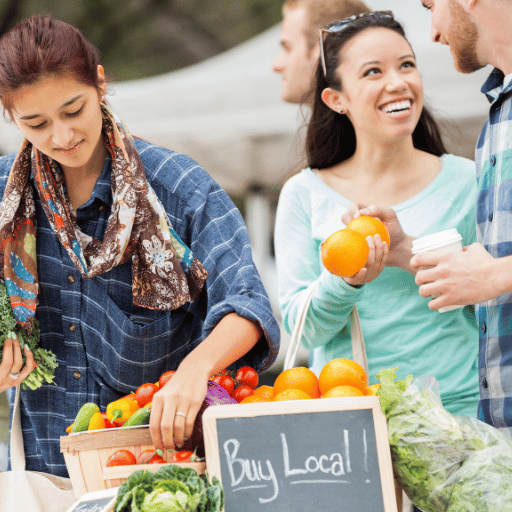
A beginner-friendly guide for better photos, better posts, and a warmer community feel, using only your phone.
You don’t need fancy gear to make your market look amazing. You need:
- decent light
- clear subjects (people + food + vibe)
- a simple routine that you repeat every week
This guide is built to be easy, practical, and realistic for busy market teams.
Quick Tips (read this first)
- Wipe your camera lens before you shoot (seriously, do it every time).
- Move closer instead of zooming. Zoom usually makes photos look grainy.
- Tap the screen on what matters (a vendor’s face, a peach, the market sign).
- Overcast Maine days are great for photos, soft light, no harsh shadows.
- Take 3–5 shots of the same moment. One will be the winner.
- For video: hold your phone with two hands and move slowly.
- Shoot vertical video for Reels/Stories/TikTok.
What Makes a “Good Market Photo”
Your goal isn’t perfection. Your goal is to make people think:
- “That looks welcoming.”
- “That food looks fresh.”
- “I want to go.”
The best market visuals usually show one of these:
- People (farmers, shoppers, volunteers, kids, neighbors)
- Food (seasonal produce, baked goods, flowers, prepared foods)
- Vibe (busy aisles, live music, smiling faces, community moments)
The Simple Market-Day Shot List
If you get these, you have enough content for a whole week.
The Minimum (10 minutes total)
- 1 wide shot of the market (tents + people + movement)
- 4 close-ups of products (colorful, fresh, seasonal)
- 2 vendor photos (smiling + “at work”)
- 2 community moments (kids, music, dogs, volunteers, friends shopping)
- 1 sign/info photo (entrance sign, hours, location board, SNAP/EBT sign)
Easy Upgrade
Record one short video clip (5–10 seconds) for each category above.
Photo Basics That Instantly Improve Results
1) Light (the biggest difference-maker)
Best light:
- Morning (setup time) and late afternoon (warm glow)
Harsh sun (usually 10–3):
- Take photos in shade: under tents, under trees, beside a building.
- Avoid direct sun on faces if you can (it causes squinting and harsh shadows).
Cloudy days:
- Cloudy is great light. Everything looks softer and more flattering.
- Try to avoid having lots of plain gray sky in the photo (angle down a little).
2) Focus and brightness (tap + adjust)
- Tap the screen on your main subject.
- If it looks too dark or too bright, slide your finger up/down to adjust brightness (most phones show a little sun icon or slider).
3) Composition (framing that looks “right”)
- Fill the frame with what matters.
- Clean the background: step left/right to remove cars, trash cans, random clutter.
- Try 3 angles:
- eye-level (people)
- overhead (tables and product displays)
- low angle (market aisle shots with tents and sky)
4) People photos that feel warm (and build loyalty)
- Capture real moments: laughing, chatting, kids dancing, hands bagging produce.
- Hands in the frame are gold (they tell a story).
- If someone is clearly identifiable (especially kids), get permission when possible.
Phone Settings (Simple “Set It and Forget It”)
You don’t need to mess with complicated settings. Just do these:
Photos
- Turn on gridlines (helps keep things straight)
- Use your phone’s highest photo quality (default is usually fine)
- Keep HDR on Auto if your phone has it (helps with bright sky + shade)
What to avoid
- Don’t use flash unless you truly have no light (it usually looks harsh)
- Don’t use heavy filters (keep it real and natural)
Maine-Specific Tips (Because Weather Happens)
- Overcast: perfect light—lean into it.
- Wind: protect your phone, and for video, shield the mic with your hand.
- Fall foliage: best photos happen in morning/late day. Midday sun can wash color out.
- Early sunsets: take key photos earlier. If it’s darker, focus on cozy moments (lights, warm drinks, indoor vendors).
Video: Capturing the Energy of the Market (Simple + Effective)
Video helps people feel what it’s like to be at your market.
It shows movement, sound, smiles, and connection in a way photos can’t.
You don’t need long videos or fancy edits.
You need short, steady clips that show real moments.
Recommended Video Settings (Set This Once)
Your everyday default (use this most of the time)
- Resolution: HD / 1080p
- Frame rate: 30fps
- Orientation: Vertical
This setting is:
- perfect for Instagram Reels, Stories, Facebook, and TikTok
- easier on storage and battery
- faster to upload
- more forgiving in lower light
👉 If you’re unsure what to choose, use HD (1080p).
When to Switch from HD to 4K
Switch to 4K video only when:
- lighting is bright and even
- you’re filming something you may want to reuse later:
- a vendor story
- a seasonal promo video
- a clip for your website, grant reports, or sponsors
- you want the option to crop or zoom later without losing quality
Think of 4K as “special use,” not everyday use.
Important Things to Know About 4K
- uses much more storage
- drains battery faster
- takes longer to upload
- not necessary for regular weekly posts
Bottom line:
HD = everyday market moments
4K = special moments worth saving
How to Hold Your Phone (This Matters More Than Settings)
- Hold your phone with two hands
- Keep elbows close to your body
- Move slowly
- When possible, stand still and let the action happen
If your phone has a “steady” or “action” mode, try it for walking shots — just know it may slightly crop the image.
Audio Tips (Don’t Skip This)
- Get closer to people who are speaking
- Turn your body to block wind
- Avoid filming right next to generators or loud music
- If audio isn’t great, use music + text instead
Clear audio is more important than perfect video quality.
What to Film (Easy, Repeatable Clips)
Aim for 5–10 second clips of:
- slow walk past a vendor table
- close-up pan of produce or baked goods
- a quick vendor wave or hello
- live music moment
- kids activity or community interaction
- hands bagging produce or exchanging payment
These short clips are easy to post, reuse, and combine later.
Where These Videos Work Best
- Instagram Reels & Stories: vertical, short, energetic
- Facebook: feed posts, Stories, event reminders
- Google Business Profile: quick atmosphere clips (short and clear)
Video Mindset to Remember
You are not making a commercial.
You are showing what’s happening.
A slightly imperfect, real video that captures warmth and community will always outperform something polished but stiff.
Short. Steady. Real.
Editing (Keep It Light and Honest)
You only need 3 quick edits:
- Crop (remove distractions)
- Straighten (horizons and tables)
- Brighten slightly (especially on cloudy days)
Avoid over-editing. The market should look like the market.
Using Your Photos and Video Across Platforms
-
Facebook
- Best for: community, event reminders, albums, vendor spotlights
- Use: wide shots + people + “what’s happening this week”
Instagram
- Best for: beauty + vibe + quick video
- Use: close-ups, faces, behind-the-scenes, short Reels
Google Business Profile
- Best for: trust + visibility + “are you legit?”
- Use: clear wide shots, location photos, product variety, hours/signage
A Simple Market-Day Routine (15 minutes total)
Before opening (5 min)
- wide shot of setup
- 1–2 vendor portraits (best light)
Peak hour (5 min)
- crowd shot
- community moment
- 1 short video clip of the vibe
Last hour (5 min)
- close-ups of products
- “last chance” table shot
- quick goodbye clip (great for Stories)
Bottom Line
You don’t need to be a photographer.
You just need a repeatable habit.If you capture:
- people
- food
- community energy
…your market will look warm, real, and worth showing up for.
Optional Tools & Accessories (Nice to Have, Not Required)
You can create great content with just your phone. These tools are optional upgrades that can make things easier or smoother, especially if one person is handling content regularly.
Think of these as quality-of-life improvements, not must-haves.
1) Small Phone Tripod (Highly Recommended)
Why it helps
- keeps photos sharp
- makes video steady
- frees up your hands
- great for group shots, vendor videos, and walkthrough clips
What to look for
- adjustable phone clamp
- lightweight
- collapsible (easy to toss in a tote)
When to use it
- vendor interviews
- time-lapse of market setup
- filming live music
- filming yourself talking to camera
This is often the best first upgrade.
2) Clip-On Microphone (For Better Audio)
Why it helps
- cleaner sound in busy, noisy markets
- especially helpful for vendor stories or interviews
Good to know
- not necessary for most clips
- very helpful when people are talking
- many affordable options plug directly into phones
When it’s worth it
- short vendor interviews
- sponsor thank-you videos
- educational clips or announcements
If audio has been frustrating, this is a smart add.
3) Portable Phone Charger (Power Bank)
Why it helps
- filming drains battery quickly
- cold weather drains batteries even faster
- prevents missed moments late in the day
Tip
- keep one dedicated “market charger” in your kit
This is a practical must-carry, even if you skip everything else.
4) Simple Stabilizer or Hand Grip (Optional)
Why it helps
- smoother walking shots
- easier to hold phone steady for longer videos
Reality check
- helpful, but not necessary
- two hands + slow movement works surprisingly well
Only worth it if you do lots of walking video.
5) Small LED Light (Indoor or Low Light Only)
Why it helps
- improves faces and products indoors or at dusk
- helpful for winter or evening markets
Important
- don’t use bright lights outdoors in daylight
- soft, diffused light is best
This is situationally useful for some markets, unnecessary for others.
6) Editing & Design Tools (Keep It Simple)
You do not need professional software.
Recommended mindset
- quick edits
- minimal filters
- natural look
Helpful tools
- built-in phone photo editor (often enough)
- simple design apps for flyers or text overlays
- one tool is better than five
Avoid tool overload; consistency matters more.
What You Don’t Need
- expensive cameras
- multiple lenses
- complicated editing software
- professional lighting kits
If a tool makes content feel harder, skip it.
A Simple “Market Content Kit”
If you want one grab-and-go setup:
- phone
- small tripod
- portable charger
- optional clip-on mic
That’s it.
Final Reminder
Tools support good habits; they don’t replace them.
Good light, real people, fresh food, and community moments will always matter more than gear.
Find Your Next Step With These Links
Marketing Tools

Google Business
Set up and optimize Google Business to help people find your market online

Facebook Business Page
Use your Facebook Page to share updates, events, and weekly market reminders.

Facebook Event Listings
Create effective Facebook Events that boost visibility and drive attendance.

Directory Profiles
Manage key directory profiles so your market shows up where people search

Newsletters: A Core Tool for Markets
Use newsletters to communicate clearly, consistently, and build loyal attendance

Smartphone Photography + Video
Take great market photos and videos using just your phone, no fancy gear needed

Tools for Content Creation
Helpful tools that make creating graphics, posts, and content easier and faster.

Using AI to Make Newsletters Faster
Use AI to speed up newsletter writing without losing your market’s voice.
Stay in know! Subscribe for updates.
Maine Federation of Farmers Markets
Social
Contact
mffmmarketingguide@gmail.com